This is very common requirement in database to move data from one server to another server. I saw many of stored procs but they are not running well at large data. So I modified one of them which was in SQL Server 2000. I updated it for SQL Server 2005.
Run Following stored proc and Enjoy it!!!
set ANSI_NULLS ON
set QUOTED_IDENTIFIER ON
GO
CREATE Proc [dbo].[spInsertScriptGenerator]
(
@p_tableName varchar(255)
)
as
Begin
Declare @tmp table
(
SQLText varchar(Max)
)
Declare @tmp2 table
(
Id int identity,
SQLText varchar(MAX)
)
set nocount on
declare @vsSQL varchar(Max),
@vsCols varchar(Max),
@vsTableName varchar(100)
declare csrTables cursor for
select name from sysobjects where type in ('u')and name =@p_tableName
order by name
open csrTables
fetch next from csrTables into @vsTableName
while (@@fetch_status = 0)
begin
select @vsSQL = '',@vsCols = ''
select @vsSQL = @vsSQL +
CASE when sc.type in (39,47,61,111) then
'''''''''+' + 'isnull(rtrim(replace('+ sc.name + ','''''''','''''''''''')),'''')' + '+'''''',''+'
when sc.type = 35 then
'''''''''+' + 'isnull(rtrim(replace(substring('+ sc.name + ',1,1000),'''''''','''''''''''')),'''')' + '+'''''',''+'
else
'isnull(convert(varchar(100),' + sc.name + '),''null'')+'',''+'
end
from syscolumns sc where sc.id = object_id(@vsTableName)
order by ColID
select @vsCols = @vsCols + sc.name + ','from syscolumns sc
where sc.id = object_id(@vsTableName) order by ColID
select @vsSQL = substring(@vsSQL,1,datalength(@vsSQL)-1)
select @vsCols = substring(@vsCols,1,datalength(@vsCols)-1)
insert @tmp
exec ('select ' + @vsSQL + ' from ' + @vsTableName)
update @tmp
set sqltext = 'insert ' + @vsTableName + '(' + @vsCols + ') values(' + substring(sqltext,1,datalength(sqltext)-1) + ')'
insert @tmp2 select 'DELETE from ' + @vsTableName
insert @tmp2 values ('GO')
if (select count(id) from syscolumns where id = object_id(@vsTableName) and ((status & 128) = 128) ) = 1
begin
insert @tmp2 select 'set identity_insert ' + @vsTableName + ' on'
end
insert @tmp2 select * from @tmp
if (select count(id) from syscolumns where id = object_id(@vsTableName) and ((status & 128) = 128) ) = 1
begin
insert @tmp2
select 'set identity_insert ' + @vsTableName + ' off'
end
insert @tmp2 values ('GO')
insert @tmp2
select 'update statistics ' + @vsTableName
insert @tmp2 values ('GO')
delete @tmp
fetch next from csrTables into @vsTableName
end
close csrTables
deallocate csrTables
update @tmp2
set sqltext = substring(sqltext,1,charindex(',)',sqltext)-1) + ',NULL)'
where not(charindex(',)',sqltext) = 0)
update @tmp2
set sqltext = replace(sqltext, ',''''',',null')
where not (charindex(',''''',sqltext) = 0)
update @tmp2
set sqltext = replace(sqltext, '(''''',',null')
where not (charindex('(''''',sqltext) = 0)
set nocount off
select sqltext from @tmp2 order by id
end
Showing posts with label Database. Show all posts
Showing posts with label Database. Show all posts
How to change Collation In SQL Server 2005
Tags:
Database,
SQL Server
If you are facing this error in moss or WSS:
The specified database has an incorrect collation. Rebuild the database with the Latin1_General_CI_AS_KS_WS collation or create a new database.
Solution:
Please change collation in sql server 2005
1. Open Microsoft Sql ServerManagement studio
2. Right click on the database and select properties
3. Select “options” and select proper collation and click OK.
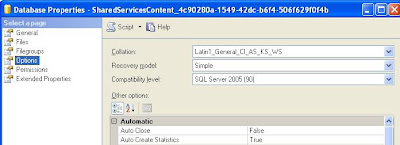
Now run the process in which this problem occurs and enjoy it.
The specified database has an incorrect collation. Rebuild the database with the Latin1_General_CI_AS_KS_WS collation or create a new database.
Solution:
Please change collation in sql server 2005
1. Open Microsoft Sql ServerManagement studio
2. Right click on the database and select properties
3. Select “options” and select proper collation and click OK.

Now run the process in which this problem occurs and enjoy it.
Cannot open backup device: Sql Server 2005 Error
Tags:
Database,
SQL Server
Generally we get this error when backup device is on the network and we don't have sufficient privileges.
To enable backups to network drives, perform the following steps:
1. The SQL Server service must be started using a domain user account to access any resources on a remote computer. Verify that the MSSQLServer service is started under a domain account that has write access to both the Server share and its underlying partition.
2. Right click on “My Computer” and select “Manage”.
3. Expand “Services and applications” and click on “services”.
4. Select the MSSQLServer service and then right click-> properties -> Log on.
5. Examine the startup options for the service and verify that This Account is selected and that a valid domain account is supplied in the form Domain_Name\Domain_account (with the correct password).
NOTE: If you changed the service to run under a domain account, you must stop and restart the MSSQLServer service.
6. Verify that the account specified has write access on the share to which you are backing up, as well as the underlying partition.To do this, perform the following steps:
a. Right-click the share folder in Explorer.
b. Click Sharing and security on the shortcut menu.
c. On the Security tab, click Permissions.
To enable backups to network drives, perform the following steps:
1. The SQL Server service must be started using a domain user account to access any resources on a remote computer. Verify that the MSSQLServer service is started under a domain account that has write access to both the Server share and its underlying partition.
2. Right click on “My Computer” and select “Manage”.
3. Expand “Services and applications” and click on “services”.
4. Select the MSSQLServer service and then right click-> properties -> Log on.
5. Examine the startup options for the service and verify that This Account is selected and that a valid domain account is supplied in the form Domain_Name\Domain_account (with the correct password).
NOTE: If you changed the service to run under a domain account, you must stop and restart the MSSQLServer service.
6. Verify that the account specified has write access on the share to which you are backing up, as well as the underlying partition.To do this, perform the following steps:
a. Right-click the share folder in Explorer.
b. Click Sharing and security on the shortcut menu.
c. On the Security tab, click Permissions.
Give Remote Permission to Databases in SQL SERVER 2005
Tags:
Database,
SQL Server
Generally we get following error when sql server is installed on another server
"An error has occurred while establishing a connection to the server. When connecting to SQL Server 2005, this failure may be caused by the fact that under the default settings SQL Server does not allow remote connections."
Solution:
1. We can enable remote connections (on the machine that's running SQL Server) by running the SQL Server Surface Configuration Wizard (usually under Start->Programs->Microsoft SQL Server 2005->Configuration Tools->SQL Server Surface Area Configuration.
2. From there we click Surface Area Configuration for Services and Connections, choose the SQL Server Instance that we want to enable remote connections for and click the Local and remote connections under Remote Connections.
3. Now stop and start the service for that SQL Server Instance so that you're settings can take effect.
"An error has occurred while establishing a connection to the server. When connecting to SQL Server 2005, this failure may be caused by the fact that under the default settings SQL Server does not allow remote connections."
Solution:
1. We can enable remote connections (on the machine that's running SQL Server) by running the SQL Server Surface Configuration Wizard (usually under Start->Programs->Microsoft SQL Server 2005->Configuration Tools->SQL Server Surface Area Configuration.
2. From there we click Surface Area Configuration for Services and Connections, choose the SQL Server Instance that we want to enable remote connections for and click the Local and remote connections under Remote Connections.
3. Now stop and start the service for that SQL Server Instance so that you're settings can take effect.
Error: The user is not associated with a trusted SQL Server connection.
Tags:
Database,
SQL Server
This error is related to user permission or server authentication mode.
Solution:
Open Sql server management studio and login with another account
select server
open properties->security
set SQL Server and windows authentication mode.
click OK.
Solution:
Open Sql server management studio and login with another account
select server
open properties->security
set SQL Server and windows authentication mode.
click OK.
Update Select Query in SQL server
Tags:
Database,
SQL Server
This is tricky. Update select query is possible using Join in sql server.
Example:
Update rest_cuisine_type
Set rest_cuisine_type.cuisine_name = temp.cuisine_name
from rest_cuisine_type inner join (Select
Tab.Col.value('cuisine_type_id[1]','int') AS cuisine_type_id,
Tab.Col.value('cuisine_name[1]','varchar(40)') AS cuisine_name
FROM @rest_cuisine_type.nodes('//cuisine_types/ctype') AS Tab(Col)
) As temp
on rest_cuisine_type.cuisine_type_id= temp.cuisine_type_id
where @rest_cuisine_type is xml type variable.
Example:
Update rest_cuisine_type
Set rest_cuisine_type.cuisine_name = temp.cuisine_name
from rest_cuisine_type inner join (Select
Tab.Col.value('cuisine_type_id[1]','int') AS cuisine_type_id,
Tab.Col.value('cuisine_name[1]','varchar(40)') AS cuisine_name
FROM @rest_cuisine_type.nodes('//cuisine_types/ctype') AS Tab(Col)
) As temp
on rest_cuisine_type.cuisine_type_id= temp.cuisine_type_id
where @rest_cuisine_type is xml type variable.
Decode URL in SQL SERVER
Tags:
Database,
SQL Server
Generally we require url decoding in web app. Here is a function for this using sql server.
CREATE FUNCTION dbo.UrlDecode(@url varchar(3072))
RETURNS varchar(3072)
AS
BEGIN
DECLARE @count int, @c char(1), @cenc char(2), @i int, @urlReturn varchar(3072)
SET @count = Len(@url)
SET @i = 1
SET @urlReturn = ''
WHILE (@i <= @count)
BEGIN
SET @c = substring(@url, @i, 1)
IF @c LIKE '[!%]' ESCAPE '!'
BEGIN
SET @cenc = substring(@url, @i + 1, 2)
SET @c = CHAR(CASE WHEN SUBSTRING(@cenc, 1, 1) LIKE '[0-9]'
THEN CAST(SUBSTRING(@cenc, 1, 1) as int)
ELSE CAST(ASCII(UPPER(SUBSTRING(@cenc, 1, 1)))-55 as int)
END * 16 +
CASE WHEN SUBSTRING(@cenc, 2, 1) LIKE '[0-9]'
THEN CAST(SUBSTRING(@cenc, 2, 1) as int)
ELSE CAST(ASCII(UPPER(SUBSTRING(@cenc, 2, 1)))-55 as int)
END)
SET @urlReturn = @urlReturn + @c
SET @i = @i + 2
END
ELSE
BEGIN
SET @urlReturn = @urlReturn + @c
END
SET @i = @i +1
END
RETURN @urlReturn
END
CREATE FUNCTION dbo.UrlDecode(@url varchar(3072))
RETURNS varchar(3072)
AS
BEGIN
DECLARE @count int, @c char(1), @cenc char(2), @i int, @urlReturn varchar(3072)
SET @count = Len(@url)
SET @i = 1
SET @urlReturn = ''
WHILE (@i <= @count)
BEGIN
SET @c = substring(@url, @i, 1)
IF @c LIKE '[!%]' ESCAPE '!'
BEGIN
SET @cenc = substring(@url, @i + 1, 2)
SET @c = CHAR(CASE WHEN SUBSTRING(@cenc, 1, 1) LIKE '[0-9]'
THEN CAST(SUBSTRING(@cenc, 1, 1) as int)
ELSE CAST(ASCII(UPPER(SUBSTRING(@cenc, 1, 1)))-55 as int)
END * 16 +
CASE WHEN SUBSTRING(@cenc, 2, 1) LIKE '[0-9]'
THEN CAST(SUBSTRING(@cenc, 2, 1) as int)
ELSE CAST(ASCII(UPPER(SUBSTRING(@cenc, 2, 1)))-55 as int)
END)
SET @urlReturn = @urlReturn + @c
SET @i = @i + 2
END
ELSE
BEGIN
SET @urlReturn = @urlReturn + @c
END
SET @i = @i +1
END
RETURN @urlReturn
END
Create Report in MSAccess
Here is the basic steps how to create report in MSACCESS and what will be sql query format.
1. Create Form and drag controls set their Name.
2. Create Query which uses form's control value as a selection criteria.
Example:
SELECT tblOrders.OrderID, tblOrders.CustomerID, tblOrders.OrderDate, tblOrders.ProductID, tblOrders.OrderQty
FROM tblOrders
WHERE (((tblOrders.OrderDate)>=[forms]![frmReports]![txtDateFrom] And (tblOrders.OrderDate)<=[forms]![frmReports]![txtDateTo]));
3. Create report using query using report wizard.
1. Create Form and drag controls set their Name.
2. Create Query which uses form's control value as a selection criteria.
Example:
SELECT tblOrders.OrderID, tblOrders.CustomerID, tblOrders.OrderDate, tblOrders.ProductID, tblOrders.OrderQty
FROM tblOrders
WHERE (((tblOrders.OrderDate)>=[forms]![frmReports]![txtDateFrom] And (tblOrders.OrderDate)<=[forms]![frmReports]![txtDateTo]));
3. Create report using query using report wizard.
Moving data from Access to SQL Server using ADO.NET
Tags:
.Net,
Database,
SQL Server
Generally it is required to copy data from access to sql server. we can do it using sql server services. But here it is performed using .NET.
static void TransferTableData(
             String AccessSourcedb,
             String DestinationConnectionStr,
             String TableName
             )
        {
            //Connection to the destination
            SqlConnection DestConnection = new SqlConnection(DestinationConnectionStr);
            DestConnection.Open();
            SqlCommand Cmd = DestConnection.CreateCommand();
            //Connection to source
            OleDbConnection OledbSrcConnection = new
System.Data.OleDb.OleDbConnection("Provider=Microsoft.Jet.OLEDB.4.0;" +
"Data Source=" + AccessSourcedb);
            OledbSrcConnection.Open();
            // Reader to source
            OleDbCommand OleDbCommand = new OleDbCommand("SELECT * FROM " +
TableName);
            OleDbCommand.Connection = OledbSrcConnection;
            OleDbDataReader OleDbDataReader = OleDbCommand.ExecuteReader();
            //bulk upload to destination
            SqlBulkCopy bulkCopy = new SqlBulkCopy(DestConnection,
System.Data.SqlClient.SqlBulkCopyOptions.KeepIdentity, null);
            bulkCopy.BulkCopyTimeout = 100000000;
            bulkCopy.DestinationTableName = TableName;
            bulkCopy.WriteToServer(OleDbDataReader);
            bulkCopy.Close();
        }